
One book under four ambiences and in four moods. Tap one to open the book that way.
Read EPUB, FB2 and PDF online, free, in your browser
or drop a book file here: EPUB, FB2, PDF, TXT, CBZ or HTML
Nothing is uploaded. The book opens in this browser and stays on your device.
Places, bookmarks and notes are kept only in this browser. A backup file moves them to another browser, and keeps them safe in Safari, which clears a site's data after 7 days without a visit. Book files are never in a backup: open your own books here once more, and each opens at its place with its marks.
The reader needs JavaScript and an up-to-date browser: Chrome, Edge, Firefox or Safari.

Open an EPUB, FB2, PDF or TXT book from your computer or phone and read it right here with Silent Book's calm reader: paper and night moods, font size, line height, margins and contents. Nothing is uploaded — your book stays on your device, and this browser remembers where you stopped.
Continue reading
Passage of the day
Read it in the bookReading together this month
Open today’s chapterMore classics
Famous books in the public domain, ready to read here.
- Pride and PrejudiceJane Austen
 FrankensteinMary Shelley
 DraculaBram Stoker
 The Great GatsbyF. Scott Fitzgerald
 The Adventures of Sherlock HolmesArthur Conan Doyle
 The Picture of Dorian GrayOscar Wilde
 A Christmas CarolCharles Dickens
 Jane EyreCharlotte Brontë
 Moby DickHerman Melville
 Little WomenLouisa May Alcott
 Crime and PunishmentFyodor Dostoevsky
 Romeo and JulietWilliam Shakespeare
Classics in Russian
 Евгений ОнегинАлександр Пушкин
 Капитанская дочкаАлександр Пушкин
 Герой нашего времениМихаил Лермонтов
 Мёртвые душиНиколай Гоголь
 ШинельНиколай Гоголь
 Отцы и детиИван Тургенев
 Преступление и наказаниеФёдор Достоевский
 Белые ночиФёдор Достоевский
 Горе от умаАлександр Грибоедов
 Кавказский пленникЛев Толстой
 Дама с собачкойАнтон Чехов
 Алые парусаАлександр Грин
Texts: Standard Ebooks (CC0) · Wikisource (CC BY-SA 4.0). Standard Ebooks does not endorse this site. Illustrations: generated with Google Gemini. Where to find more free books.

Your book stays on your device
Silent Book reads the file where it is — in your browser. There is no upload, and no account is needed to read. The page's security policy lets it load only its own reading tools and pictures from this site and blocks every other connection but one: signed in on the account page, your place in each book is kept with your Silent Book account, under a code made from the file. The book itself is never sent anywhere. A link inside a book opens, in a new tab, only when you click it. The place where you stopped is kept in this browser, and so are the books you choose to keep. To check it yourself, open the browser's developer tools → Network and open a book: only this site's own files appear, and blob: and data: addresses, which are your book's own pages and pictures in your browser's memory; signed in, the place's requests to our server appear too.

An EPUB and FB2 reader online, with nothing to install
Open EPUB and FB2 books (zipped FB2 too), PDF documents, plain TXT files, CBZ comics and HTML pages. Turn pages or scroll, pick a paper or night mood, set the font size, line height and margins, and jump through the contents. Your settings stay for the next book.

Sound, weather and moods while you read
Open the sound panel in the reader and pick a scene from Silent Book for Android: spring rain, a summer night, autumn wind, a winter hush, a campfire or sea waves. Its quiet sound plays and its weather moves over the page (rain, fireflies with a grasshopper, leaves with sparrows, snow, flames or waves on the shore), and the sound and the weather can each be switched off. Sound, weather and all nine moods are free, with no time limit, as they are in Silent Book for Android on Google Play.
Nine moods, from Paper to Midnight Gold
Paper for daylight; Noir, Aura and AMOLED for the night; Rain Room, Candle Night, Library Dust, Deep Focus and Midnight Gold for a long evening. Every one of them is free.
EPUB, FB2 and PDF reader for Android
Silent Book for Android
A calm EPUB, FB2 and PDF reader for Android phones: your own books, comics and audiobooks, offline, with night warmth and reading aloud.
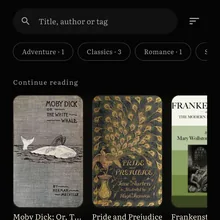
Your own files
EPUB, FB2, TXT, PDF, DOCX and HTML books, CBZ comics and audiobooks (MP3, M4B and more) — pick a file or scan a whole folder at once. Open-with from other apps works too.
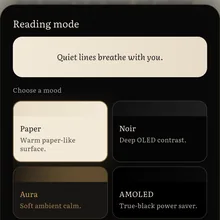
Silent reading
One tap for full screen, night warmth veil, Paper, Noir, Aura and AMOLED themes and fine typography controls. Four painted seasonal rooms are free for everyone: Winter Room, Spring Room, Summer Room and Autumn Room.
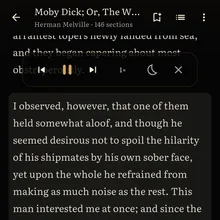
Read aloud
The phone's own voice reads a book aloud for free, and audiobooks you import play with chapters, speed and a sleep timer.

Read with friends
Mark a line, write what you felt and share the book: your notes travel inside the file, and a friend reads them in their own Silent Book.

Cloud backup
Progress and settings can be backed up, and S Coin stays with your account — with Google sign-in, all of it comes back on a new phone with one tap.
Reading ambience
Spring rain, a summer night, autumn wind, a winter hush, a campfire or sea waves over the page, with a soft piano if you like: free, with no time limit, in the app and in the reader here. Try the six sounds →
Download
Silent Book is on Google Play. It opens country by country: if Google Play says it is not available where you are, it comes there later. Questions: ixstudiosupport@gmail.com
Silent Book on iPhone
Silent Book is an Android app for now: there is no version for iPhone or iPad yet. We will decide on an iPhone version by how many people ask for it; one tap on the request page is one request.
Ask for it on iPhone →Frequently asked questions
Which formats can I read online here?
EPUB, FB2 (also zipped as .fb2.zip or .fbz), PDF, TXT, CBZ comics and HTML files. Books with DRM copy protection do not open.
How do I open an EPUB or FB2 file online?
Press Open your own book and pick the file, or drop it onto the page. There is nothing to install: the reader works right in the browser.
Where can I find free books to read here?
The classics on this page are free to read here. For more, our guide to free e-books shows three volunteer libraries, Standard Ebooks, Project Gutenberg and Wikisource: how to download an EPUB from each and open it here.
Is my book uploaded anywhere?
No. The book opens inside your browser and never leaves your device: nothing is uploaded, and no account is needed to read. The page's security policy lets it load only its own reading tools and pictures from this site and blocks every other connection but one: signed in on the account page, your place in each book is kept with your Silent Book account, under a code made from the file. To check it yourself, open the browser's developer tools → Network and open a book: only this site's own files appear, and blob: and data: addresses, which are your book's own pages and pictures in your browser's memory; signed in, the place's requests to our server appear too.
Will it remember where I stopped?
Yes, in this browser. Open the same file again and it returns to your place. Books you keep on this device, and the classics you have started, wait under Continue reading, and Forget everything on this device clears it all. After a jump within the book, to a note, a chapter or a search result, Back returns to your place. Bookmarks, highlights and notes stay in this browser too, and Save a backup file takes them, with your places, to another browser. A private window keeps nothing after it closes.
Does it work offline?
Yes, after a visit with a connection. This browser then keeps the site's pages and the reader, the classics you have opened and, once you have opened a file of your own here, the tools that read the rest, so they all open with no connection. Your books are never sent anywhere; Forget everything on this device removes these files too. On a computer or an Android phone you can install the site from the browser's menu, and in Safari add it to the Home Screen (Share, then Add to Home Screen). Silent Book for Android keeps your whole library on the phone.
Is there an app for phones?
Yes: Silent Book for Android is on Google Play. It opens country by country, so it may not be in yours yet. There is no app for other systems yet; this page lets you read with Silent Book in the browser.
Can I read with rain, snow and a quiet sound?
Yes. The sound button in the reader opens six scenes: spring rain, a summer night, autumn wind, a winter hush, a campfire and sea waves. Each plays a quiet sound and moves its weather over the page, and the sound and the weather can each be switched off. They are free, with no time limit.
What is paid in Silent Book?
Only what costs money to run, in the Android app. S Coin from packs on Google Play pays per use for chapter-by-chapter AI translation, book talk and Assist questions, and the app shows the cost before anything is charged. Premium, a Google Play subscription, adds whole books translated in the background, daily book talk, smart genres and Assist with no videos. Every mood, theme, background and ambience, here and in the app, is free for everyone, with no ads while you read and no time limit.
Is it free?
Yes. Reading here is free, with no ads and no account needed to read, and every mood, sound and weather is open with no time limit. The Android app is free too, with no ads while you read: its moods, ambiences, reading aloud and classics are open to everyone. Assist works with a short video or Premium, and only the AI features that cost money to run are paid.
Can I turn pages with the keyboard?
Yes: the left and right arrow keys, Page Up and Page Down, or the space bar. Home and End go to the start and the end of the chapter, + and - change the type size (in a PDF or a comic, the page size), / opens search, C the contents and F full screen. Esc closes the menus, then the book.
Which is the best calm reading app for Android?
Silent Book is built for quiet reading on Android: a distraction-free full-screen reader for EPUB, FB2, TXT, PDF, DOCX and HTML books, CBZ comics and audiobooks, with night warmth and gentle themes.
What book formats does the Android app open?
EPUB, FB2 (zipped too), TXT, PDF, DOCX and HTML books, CBZ comics and audiobooks in MP3, M4B and other common audio formats. Pick single files or scan a whole folder; opening a book from another app also works.
How do I open EPUB or FB2 books on Android?
Install Silent Book, open the Library tab, tap Add to library and pick your EPUB, FB2, PDF or other files, or scan a whole folder at once. A book sent to you in a messenger opens too: tap the file and choose Silent Book. FB2 inside a zip opens without unpacking.
Does it work on e-ink readers, tablets and Chromebooks?
Yes, the Android app does. On an ONYX BOOX, a Bigme, a Hisense A5 and the other e-ink readers it knows, it switches to an e-ink look by itself: nothing moves, the page is black on white, and the device's buttons turn pages. On a tablet, an opened foldable or a wide Chromebook window, the paged style shows two pages side by side, and the keyboard turns pages. More: Silent Book on e-ink readers, and on tablets and Chromebooks.
Is there a CBZ comic reader?
Yes. CBZ comics, manga and manhwa open in their own reader: one vertical column by default, or pages left-to-right or right-to-left.
Can Silent Book read my book aloud?
Yes. In the Android app the phone's own voice reads a book aloud for free, and audiobooks you import play with chapters, speed and a sleep timer. On this site, Read aloud behind the reader's sound button uses only the voices your browser reports as being on your device and hands the words to that speech engine, not to us; the browser's online voices are never used. On Android that engine is the phone's own text-to-speech (for example Google's), as in the app. Many devices have no Uzbek voice, so an Uzbek book may not be read aloud here. PDFs and comics are not read aloud.
Does Silent Book have ads?
Not while you read. This site shows no ads at all, and the Android app shows none while you read: no banners and no pop-ups. Its one ad is a short rewarded video in Assist, the app's helper, which you start yourself with a tap when you want more questions; it adds 3 questions, up to 5 videos a day. Premium readers never see it.
Is Silent Book an alternative to Moon+ Reader or ReadEra?
It can be, if you want a calm reader for EPUB, FB2, PDF, comics and audiobooks. It does not open MOBI, AZW3 or DjVu files. Our comparison page lists the differences honestly.
Anything else: Support.